AI Research Agent for Zotero
BibGenie powers your research workflow natively in Zotero.It manages your library, searches, analyzes, and reasons with you
Trusted by researchers & students from leading universities worldwide













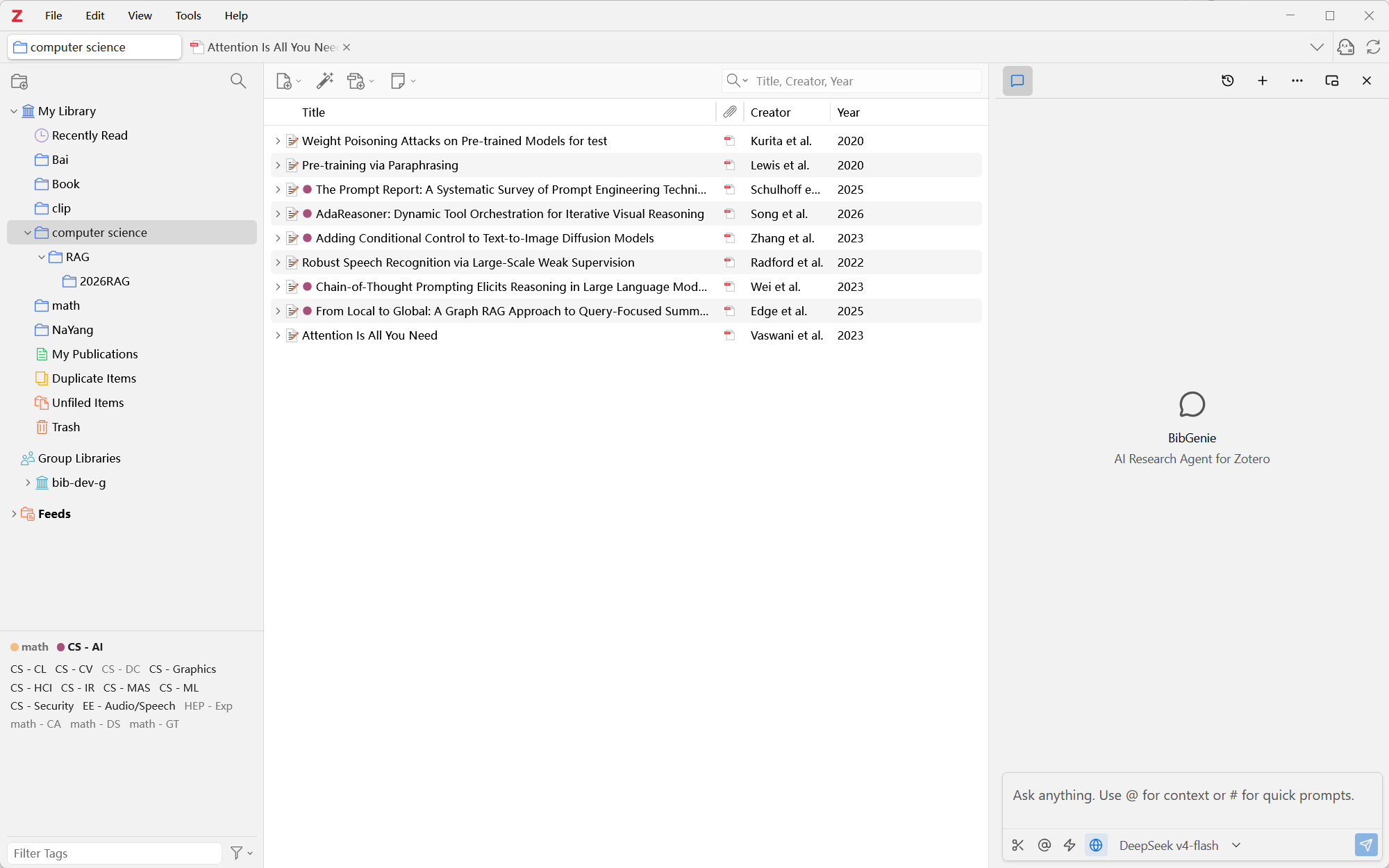
Built into Zotero
BibGenie lives in Zotero’s side panel and stays with you as you move between the Library and Reader. It can use the active item and current page as context, so you can ask about what’s in front of you without moving your work to a separate AI app.
- Stays docked in Zotero's right sidebar
- Automatically tracks active PDF and current page
- Zero context-switching or manual file uploads
Bring Any Zotero Context into Chat
Type @ or use Add Context to add items, notes, tags, and collections. Or choose Add to Chat from the Library or Reader to bring in selected items, attachments, annotations, PDF pages, EPUB sections, and selected passages. Combine them in one prompt to work across multiple sources.
- Type @ to summon items, notes & collections
- Right-click any PDF or EPUB text into chat
- Follows the exact paper and page in front of you
- Combine multiple sources in a single prompt
Search Your Library — and Beyond
Start with your Zotero library, searching by keyword or meaning. When you need broader coverage, discover scholarly works through OpenAlex. Your library remains the starting point—not generic web results.
Search your personal library by meaning, uncovering related papers even when terminology differs.
Tap into 250M+ scholarly works worldwide with real citation context.
Trace Every Claim to Its Source
BibGenie places citations beside the paragraphs they support. Select one to return to the relevant PDF, EPUB, snapshot, note, or Zotero item and inspect the supporting evidence in context — so you never have to worry about AI hallucinations.
Every generated claim anchors to exact sentence-level locations in your PDFs. Verify instantly in the native Zotero reader.
Organize Your Library — Safely
Ask BibGenie to organize collections, manage tags, and review or update metadata. Before a write or batch action runs, you see the proposed changes and affected items and choose whether to approve them.
Your Data, Your Control
Everything stays on your machine. You decide how — and whether — data leaves.
Local-First Storage
Chat history, library index, and vector embeddings live on your disk. Nothing is uploaded unless you choose to.
Choose Your Model Route
Run models locally, connect your own API key, or use our managed service. The choice is always yours.
Zero Middleman
No proxy logging, no data retention. When you bring your own key, requests go directly to the provider.
How Your Data Flows
Your Own API Key
Model requests go directly from your machine to the provider API. No BibGenie server in the middle.
- Direct client-to-API connection with zero middleman proxy
- Supports OpenAI, Claude, DeepSeek, Gemini & local Ollama
BibGenie Managed
One-click convenience with zero setup. No chat logs or prompts stored on our servers.
- One-click ready — no API keys or developer setup needed
- Access frontier models instantly with high availability
Pricing
Credit-based plans for Zotero-native AI research. Paid plans provide more monthly credits and lower credit consumption for frequent and in-depth research.
BibGenie is currently under active developmentView ChangelogGet the Pro Lifetime plan at the early bird price of $199!
Need more credits?
Add 5,000 extra credits for $6.99. Useful for heavier paper reading, comparisons, or a busy research week without changing your plan.
Included in every plan
Core BibGenie capabilities are available on Free, Pro, Max, and Pro Lifetime.
- Zotero-native chat and Add Context. Learn more
- PDFs, notes, snapshots, images, and traceable citations. Learn more
- Keyword and semantic library search. Learn more
- Save answers back to Zotero notes. Learn more
- Academic discovery with OpenAlex. Learn more
- Multi-source metadata review, cleaning & diff approval. Learn more
- Web Search and Web Extract. Learn more
- BYOK, custom models, Ollama, and LM Studio. Learn more
Frequently Asked Questions
AI Research Agent for Zotero
BibGenie powers your research workflow natively in Zotero. It manages your library, searches, analyzes, and reasons with you